Truth is, no founder/dev can 100% guarantee that an app won’t get rejected. Apple can reject your app for many reasons you have no control over. But you can also make your app review process feel boring. Believe me, that’s the real goal.
This AI app checklist is built specifically for founders and teams building apps that use AI chat, generate output, summarize content in "smart" ways, etc., and/or send user data to models.
Lessen the variables that lead to ambiguity (i.e., eliminate them), and in the process, you reduce the amount of guessing reviewers do, which reduces the number of rejected submissions. Let’s introspect!
Why do most of the AI Apps Fail the App Store Review?
It’s difficult to evaluate the reliability of AI apps because their responses are unpredictable. A calculator will always perform the same function. A chat feature powered by an AI can respond in a different way each time, use a different tone each time, and behave differently from one interaction to another.
Also Read: Why Your Company's AI Policy Is Legally Dangerous
Reviewers tend to be concerned about risks, not hype. The primary concern of reviewers is "Will this potentially put users at risk? Will this trick users? Will this potentially leak data?"
Privacy Risk
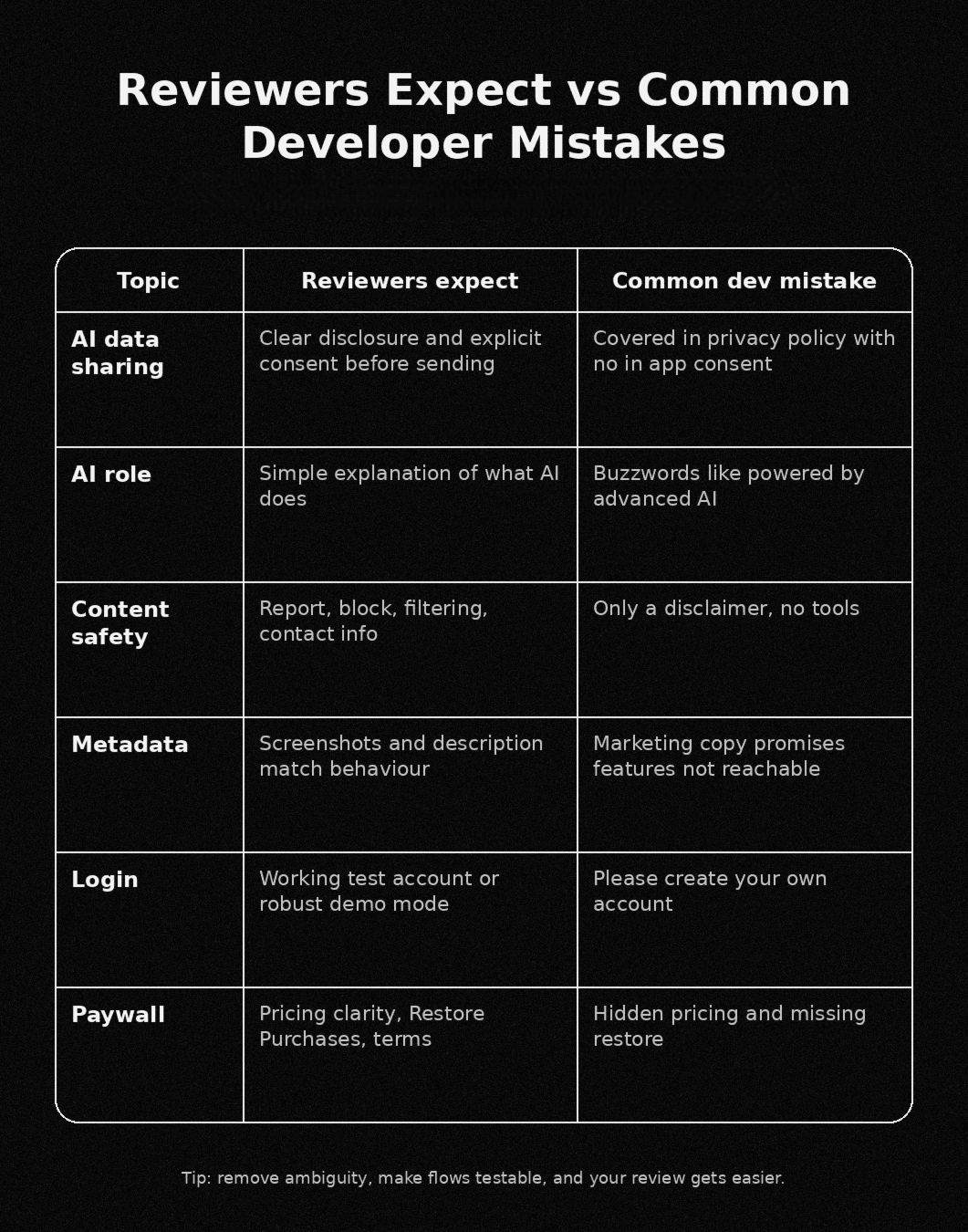
If your app transmits a user's private information to an outside source (a third-party AI system), Apple requires two things: transparency into how your app collects and uses user information, and explicit user consent before transmitting the user's private information. Failure to obtain clear user consent will likely lead to rejection. Even if your code has no bugs.
Also Read: The privacy Stack Every Developer Needs: 2026 Edition
Content and Safety Risk
In practice, AI-generated content is treated similarly to user-generated content. Therefore, if your app generates harassment, sex-related material, self-harm encouraging language, hate speech, threats, etc., then you require actual safety measures to protect against such abuses, and simply placing a disclaimer stating you are responsible for what’s generated will not suffice.
In addition to reporting and blocking mechanisms, some form of content filtering is required.
Anonymous or random chat features pose an additional level of risk. Some designs seem to intentionally invite abuse; "we moderate" may not be sufficient to avoid rejection.
Copycat and Brand Risks
If your app's name, icon, or advertising appears to borrow someone else's identity, you may be rejected. Additionally, using a well-known model's name as your own or creating branding that could be perceived as similar to a competitor's will result in rejection.
Mismatch risk
Reviewers compare three things: metadata, in-app copy, and actual behaviour. If they don’t match, you get hit. Screenshots promise features that are not reachable. Privacy labels say “no data collected” while prompts go to a server.
Also Read: The AI Code Review that Prevented a $50M Hack
How Apple actually reviews AI apps
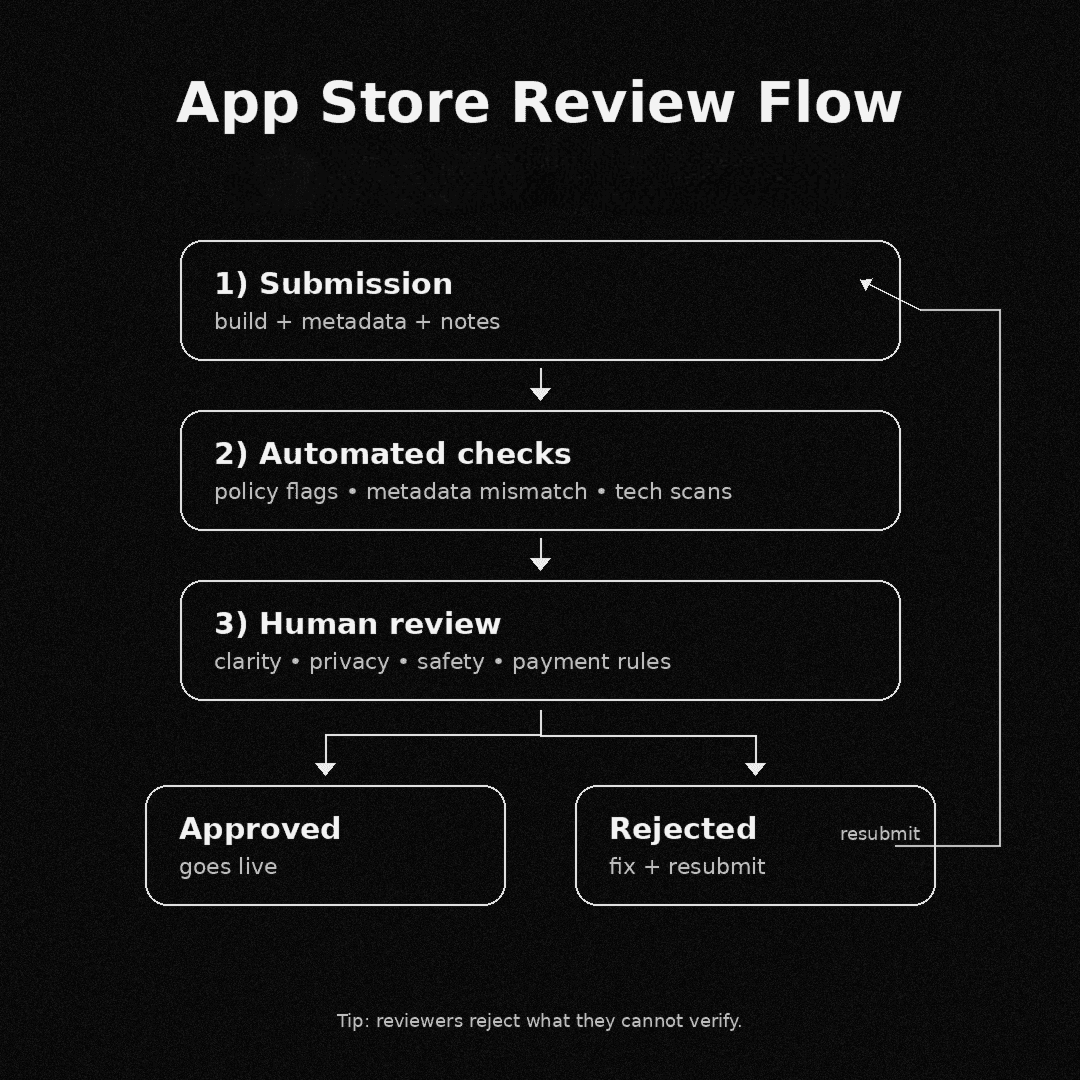
Think of your review process as a funnel, with automated checks occurring before an individual reviews your app. The checks include: policy triggers, malware signals, in-app purchase setup issues, metadata mismatches, and basic completeness issues (placeholders or dead links).
Once you pass this automated screening, a human reviewer will then view your app and try to determine its functionality, as well as the type of data it interacts with and the location that the data is being sent. If the app sends text, voice, images, contacts, or sensitive information to a model, or if the app provides open-ended chat or smart summaries, they fall under more scrutiny.
Also Read: The $1B AI Stack Mistake Every Company is Making
The most typical grounds for which devs have had their builds rejected are unclear consent policies or privacy and real data flow mismatches. Apart from that, missing report/block tools, messy app store connect notes, and tricky payments/no restore purchases feature reduce the scope of approvals.
Core guidelines that matter most for AI apps
If you are building an AI app, Apple usually judges you on a few “high-impact” rules. Nail these, and most reviews become straightforward.
User Generated Content & Chat Risk (Guideline 1.2):
If an application has a feature that uses AI chat or a community area to allow users to post content, the user will need to be protected by safety features:
- Filtering of objectionable content;
- Reporting and quick responses to complaints;
- Blocking abusive users;
- Contact information for users (random or anonymous chat styles are considered "high-risk" and may be rejected).
Accurate Metadata, No Hidden Features (Guideline 2.3):
Your screenshots, description, and privacy statement must reflect the overall experience of your application. There cannot be any hidden or inactive features in your application. Any new AI-based features must be clearly described in "Notes for Review" and easily accessible by the reviewer.
Copycats & Brand Use (Guideline 4.1):
Do not impersonate another application. Do not use another developer's icon, branding, or product name in your application name or icon without approval.
Payments (Guideline 3.1.1):
In order to unlock features or subscription levels within your application using In-App Purchase, you must adhere to the guidelines outlined below:
- Clearly show the cost of unlocking the feature and the billing cycle;
- Disclose Auto-Renewal options;
- Explain any Free Trial terms and conditions;
- Provide Restore Purchases;
- Link the Terms and Privacy page from the payment wall;
- Explain how to cancel a subscription or purchases in plain language.
The right way to design AI Apps to pass Apple review
AI app rejections happen cause the reviewer can't tell what your AI does with user data.
Data, disclosure, and consent
If you send anything user-related to a third-party model, make it obvious. “User-related” includes prompts, chat text, voice transcripts, images or documents, imported contacts, and even telemetry that can still link back to a person.
Use an "AI Processing" screen the very first time that someone interacts with your AI to show them exactly how their data is being used:
- What you send?
- Why are you sending it?
- Who will process it (your servers or third-party services)?
- How long will you retain this information?
Consent must occur right before the user's data leaves their device; it must be specific, and can be reversed through a "Settings" toggle; if the app cannot function at all without AI functionality, state so clearly.
Alignment of Data Flow & Policy
Many reviewers will ask one question: Does your declaration of how your app handles user data match how the app actually handles the user's data?
First, create an internal map of how data will flow within your app, then replicate that map across all documentation where you describe how you handle user data (privacy policy, App Store privacy labels, in-app copy). Failure to align these maps can result in rapid rejection from Apple.
Approval First Design
When designing for approval, assume that the reviewer will open your app, tap the most obvious button to interact with your AI, run one prompt, review how clearly your paywall is presented, check your privacy links, and leave your app. Make this process as smooth as possible for the reviewer.
Displaying Disclosure Near the First AI Interaction
The reviewer needs to understand how their data is being processed immediately after they first use your AI, and display your disclosure near the first interaction point.
Don't Hide Data Flows
Provide a test account or demonstrate how to use a demo version of your app using safe sample prompts to allow reviewers to experience the full lifecycle of how your app will collect and utilize their data.
Safety of Output
Don't just add a disclaimer; add basic tools for the reviewer to report potential issues with the output, include your contact information, provide filters for users to block other users if there’s social interaction, and do not present potentially inaccurate AI answers as fact.
Submission, review notes, and what to do after a rejection
Rejections mostly are cause of unclear or unmatched guidelines, not because the app is totally broken or unfixable. Hence, it’s very important to run a few checks before directly submitting to App Store Connect.
Your app's AI features, any sort of third-party AI services that you might've used, or anything related to consent seeking; all these things should be clearly explained in plain, basic language so that there's no confusion. Other than that, privacy policies, labels, and actual data flow shouldn’t be misaligned at any cost.
Once done checking these, next check these three code aspects:
- No placeholder screens.
- No links that are dead.
- No stuck/dead kinda flows.
Server errors or any offline data management handling needs to be neat. If needed, provide demo mode or test credentials along with the app if a logging function is associated.
When all of these are sorted, don't forget to incorporate pricing, billing cycle, renewal/auto-renewal options, and any applicable trial duration-related info within the payments or privacy page, which can be direct links as well.
At last, check if your metadata is accurate, and provide reviewer notes clearly. If rejected, correct the issues that reviewers weren’t able to approve. Only appeal if you can demonstrate compliance.
The boring review is the best review
The key is in making the design of your app as easy to understand by a stranger as possible.
That stranger should be able to see the data flows in your app; the controls available to users should be clear; and the identity of your organization should be clearly identifiable in your app.
Share your app's current workflow (onboarding, initial AI interaction, any paywalls, settings) and tell devs to generate both a "reviewer-ready notes" document and a customized checklist based upon the workflow you provide.
Once you’ve done this, reviewing your app will become less of a gamble or lottery and more of a systematic process.