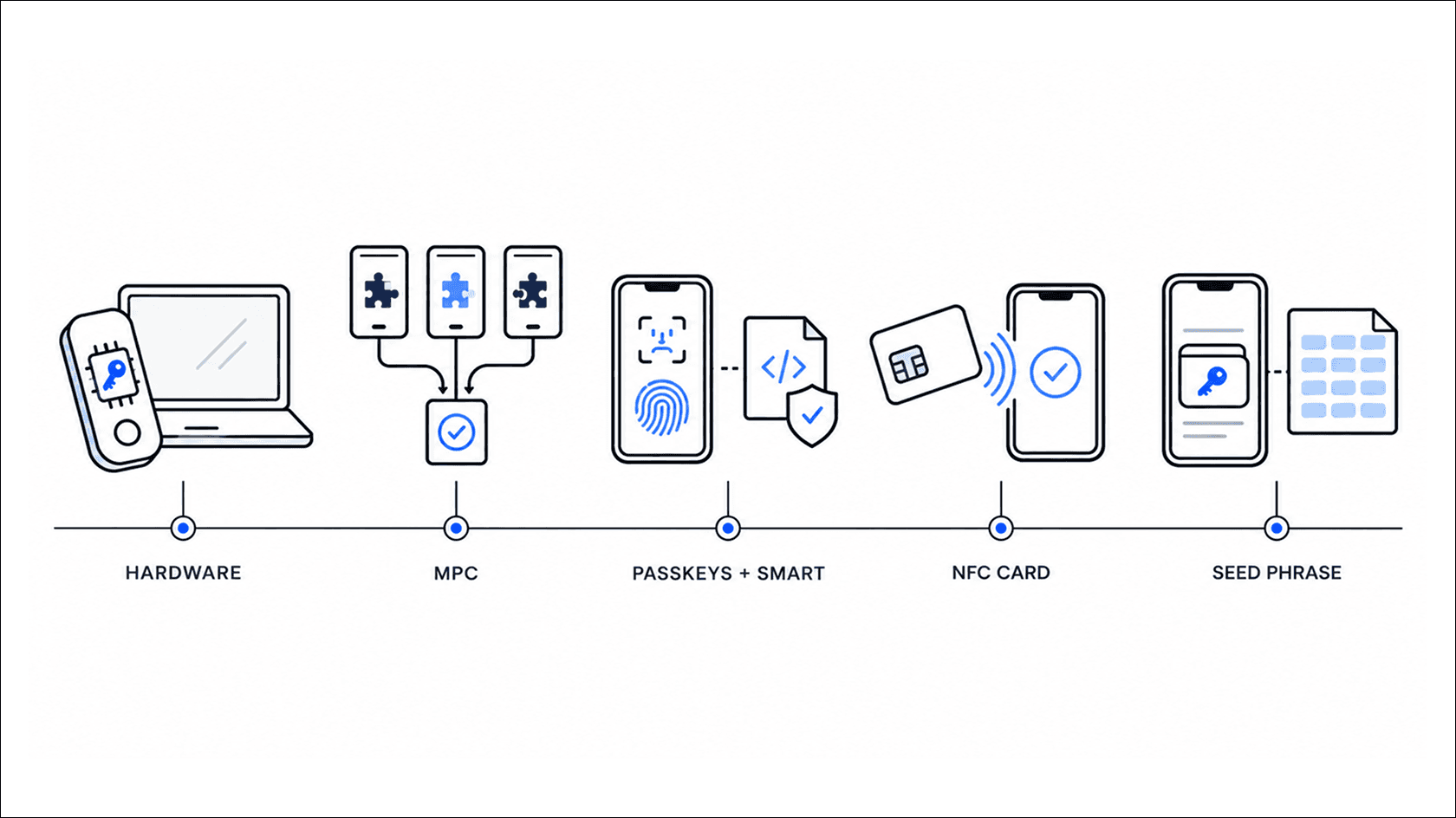
The MPC vs. hardware wallet debate is for techies or people who love exploring the ins and outs of one tech versus another. Hardware wallets protect the keys. MPC can distribute signups. For a user, the value lies in how easy it is to access the money tomorrow.
No wallet can be called the safest, no matter what its parent company claims. Hence, always have a threat model in place in case things go south. For instance, you can improve authentication or add spending and recovery rules.
This article compares five wallet security setups, their main trade-offs, and where each fits best.
How to compare the five wallet security setups
Your digital assets live on a blockchain, but your wallet controls access. In the early days of blockchain wallets, if you lost access to your keys or wallet, you lost your funds forever.
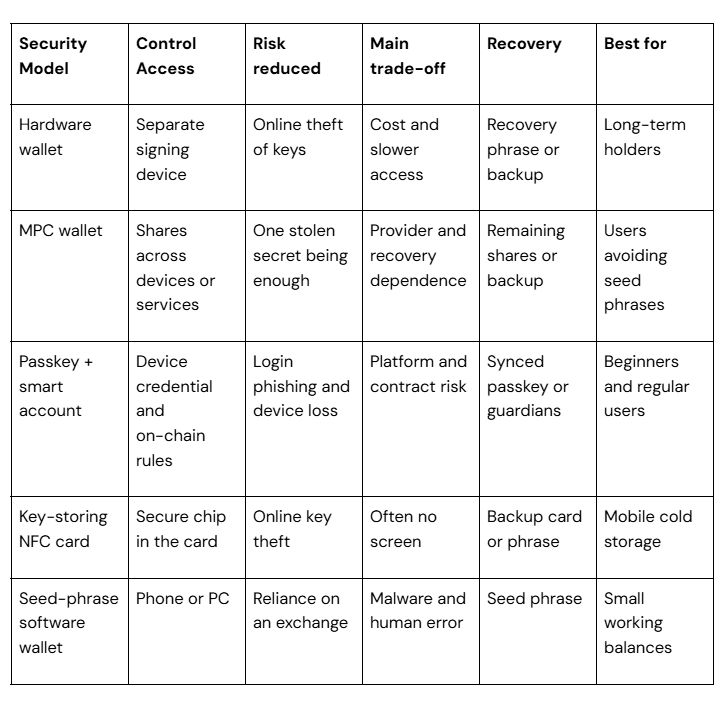
Today, however, lost private keys don’t mean lost funds. Wallet technology has evolved over the years to incorporate room for error and misplacement. The five security models in the table below are most popularly used for wallet technology worldwide:
Comparison table showing five wallet types, their features, and trade-offs.
Don’t consider the above table as security ratings. Consider them more as design-level comparisons. The actual product route and backup choices still determine the final transactional outcome within crypto.
Working procedure of each wallet security model
How a wallet’s security model works in practice
Model 1: Hardware wallets
You've probably heard of Ledger or Trezor. These wallets store private key material on a separate device. When your PC prepares a transaction, the hardware device signs it internally. Even if the PC or laptop gets infected with key-stealing malware, your keys remain safe as the transaction gets signed offline, on a separate device.
However, problems arise when you confirm reluctantly or carelessly (known as blind signing). It can still be signed as an approval, which could mean you're giving away your funds.
So, you need proper safety guidance. Use only verified channels for purchases. Verify your backup, its manufacturer, and their support process. Also, have an access method uploaded to your drive just in case you need access some other way.
Model 2: MPC wallets
Multi-Party Computation (MPC) lets you split control into equal shares between two or more parties. These shares can work together to create a valid signature. No signatory ever knows or can reconstruct the full composition of the shares.
Suppose there’s a 2-out-of-3 setup where your phone, some other service, and another device include one share each. Even if someone steals one share, share rotation (as in threshold designs) lets you replace the lost device without changing the full address. In technical terms, this is called share rotation, or replacing one device with another to preserve the account's functionality or continue owner participation.
A passkey is connected to the app/website. That way, no one can fake your biometric data to log in. That’s ideal. But once logged in, the app/website can't tell whether you or someone else requested the transaction.
NFCs act as the bridge between the card and phone. A hardware random number generator creates a private key inside an EAL6+ chip, which allows the card to sign transactions internally.
The app also offers a seed phrase option. This key isn't readable and can't be retrieved from the chip. Cold storage in a card format is the encryption you get. The phone only shows you the details, but you can't recover anything if you lose all cards/seedless setup.
Tangem’s default seedless setup is a good example. Another NFC metal card gaining popularity right now is WATS. WATS uses the NTAG 216 chip, offers password-protected memory, and pairs with the phone. It stores keys within the app and functions as a presence factor. Authorization requires only a tap. However, it's still not safe against malware or cloning.
These wallets are cheap and may work for a small number of devices. But device security and accurate daily backups are on you. As a precaution: Download from official sources, then verify every recovery word and the order of each word.
Seed-phrase wallets can also connect to a hardware signer through the wallet interface. Use that connection. Never import the hardware wallet's recovery phrase into the app, because that breaks key isolation.
Wanna jog your memory about the how and what of DeFi wallet handling? Read this article to understand the difference between them and traditional wallets.
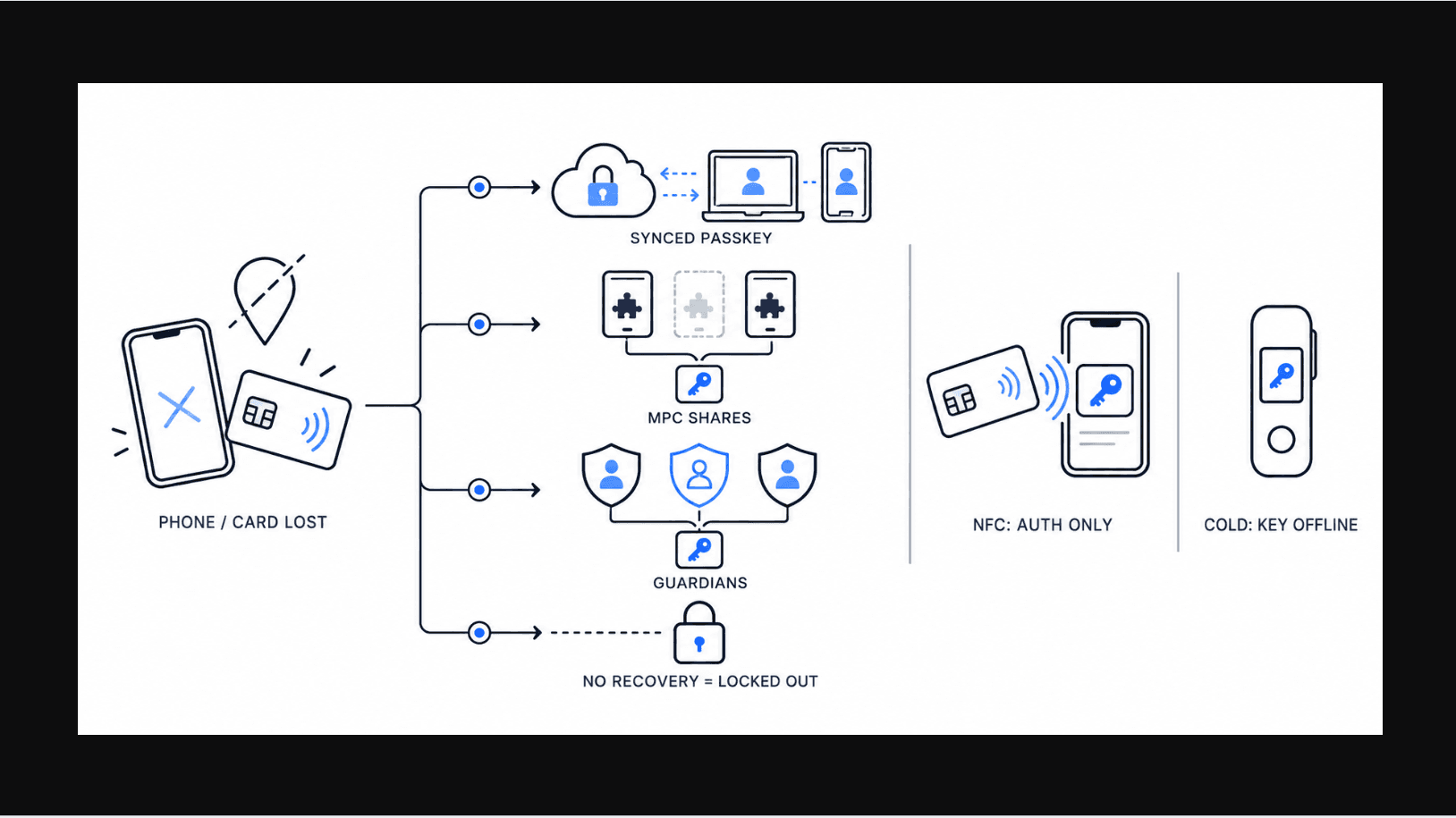
What if your phone or card goes missing?
What happens if your phone or card goes missing
You'll only lock yourself out of the seedless wallet if you lose your recovery route. Your synced passkey may still be available on some other authorized device or an MPC wallet. Whether you have access depends on how many shares or backups you created.
Go for end-to-end encrypted syncing instead of simple cloud photo storage. New tech like Guardian Recovery is also available today as a replacement for smart account signs. You can also use rootless, device-bound passkey setups.
Now, if you think adding an NFC tapping system would make cold storage equal to a wallet, you're wrong. It won't, because the private keys will still stay on your phone, and it would stay exposed to any digital or malware attacks on the device.
The card is authentication-only, i.e., it just confirms you have the physical card. Cold storage can act as an offline holder of your keys.
The best wallet fit, as per threat profiles
For the cold vault believers
Long-term holder? Then an NFC card that can store keys, or any offline hardware signer, would be the most suitable. Your focus here should be to preserve the signing keys away from the online devices and keep the backup separate. For moments when you need access, the restore protocol has to be in place in case the storage device acts up.
Phygital option for regular token swappers
If you are more into NFTs or DeFi and your daily activity involves token swapping between different NFT apps, tap-to-authenticate NFTs or non-custodial apps would be the way to go. Keys stay within the app, although confirmation is validated via the physical card. It’s not cold storage, but it for sure limits access to private keys for you as well as potential intruders.
For the forgetful ones
This one’s me…and I hate seed phrases. That's why passkey-based smart accounts and MPC wallets are more of my forte. The dependency is on a proper backup and sharing arrangement, so guardians (to whom you share, i.e., peeps or devices) need to be trusted enough so that they won't misuse your provided authorisation.
Key Takeaway
Before buying a replacement for your broken phone/device, understand what restores access, where you have kept it, and what else you need to regain it. DeFi enthusiasts also add another factor: choose whichever wallet you approve of, but set strong guardrails.
Also, money or crypto stored for experimental activity and savings needs to be kept separate. For that:
If you are a long-term holder, use a validated hardware signer and a key-storing card. Store the backup elsewhere.
Non-custodial NFC tap-enabled card and app combo if you are pro on DeFi. Go for readable approvals and spend yourself while keeping the balance limited.
Keep an independent recovery path in place and handy that doesn't rely on your devices.
Don’t depend on seed phrases; instead, consider passkey-based accounts or even MPC, with a full understanding of your recovery route.
My final suggestion: Don't lose your only route to access, as Howell did. Choose the easiest step-by-step recovery procedure you can follow - one that doesn’t rely either on physical or digital means.