During post-COVID times, algo trading was something of a fugazi for the unknown and a skill reserved for the big-brainers. The rest used to trade only based on self-judgment and market experience, which, btw, is never constant.
Times have changed. Terminal AI agents are now replacing mere humans… everyone’s sorting out some sort of automated trading setup at home.
And why won’t they?
You can run them locally (a raspberry-pi/ your RAM/GPU can probably handle compute). That’s enough to pull out time-specific data to make puts or form suggestions. This is different from chatbots or text-based prompts.
It’s an entire operator-controlled system. The pillars involve code, open-source software, real-time data, and then finally an LLM. And now you’re packed to jump into the markets.
The initial $20ish you still have to spend (free real estate’s a myth).
That covers the cost of the LLM API and maybe a few other fees, though the core software is open source and free to use. Oh, one thing to keep in mind is that subscriptions don’t directly include API credits if your terminal doesn’t support OAuth access.
You can't prompt your way into the active markets
I get it. You have some AI subscription, and now you’re thinking of starting trading with it cause of "artificial intelligence” and “speed” and whatever. Sorry to say, but you can’t cause that ship has already sailed.
Any LLM is as powerful as the data it is trained upon and the context it is provided with…and general-purpose LLMs are usually far from actual trading market data. Calculating alpha using fetched details and prompting is what creates “hallucinated alpha”. Invented facts, sure-shot statements, but the microsecond to put in has already passed.
Simply put…basic data interpretation cannot work in trading cause decisions are to come from real-time data (something that’s constantly changing) instead of model memory.
The upper hand of AI trading terminals
Trading terminals emulate and execute throughout the entire workflow instead of just answering queries. They fetch the order book, do depth imbalance calcs, contrast such with historical performance — all while saving each of the previous steps for even faster execution the next time. The error ratio significantly reduces the cause of this.
The core model gets the intent, maths is handled by Python, and everything becomes ready to execute only after the user gives permission.
How does an agent-native terminal function?
Three main elements make up the open source stack of an AI terminal.
- The interface layer is the app running on a CLI or a web workspace.
- The analytics layer involves preprocessing via technical indicators, portfolio analysis, and backtesting through Python (everything runs locally).
- In the last orchestration layer, the agent selects the tool as per the model context and explains the results to the user.
An example of this is the Fincept Terminal.
It uses Qt6 for UI and design and native C++20 for code, along with Python for added features. Through Python, REST, and MCP, the financial data is fetched from OpenBB’s Open Data Platform. The agent setup runs commands and uses subscriptions that the user provides via API keys (again, everything is set up locally, isolated). No dependency on external hosting or limits.
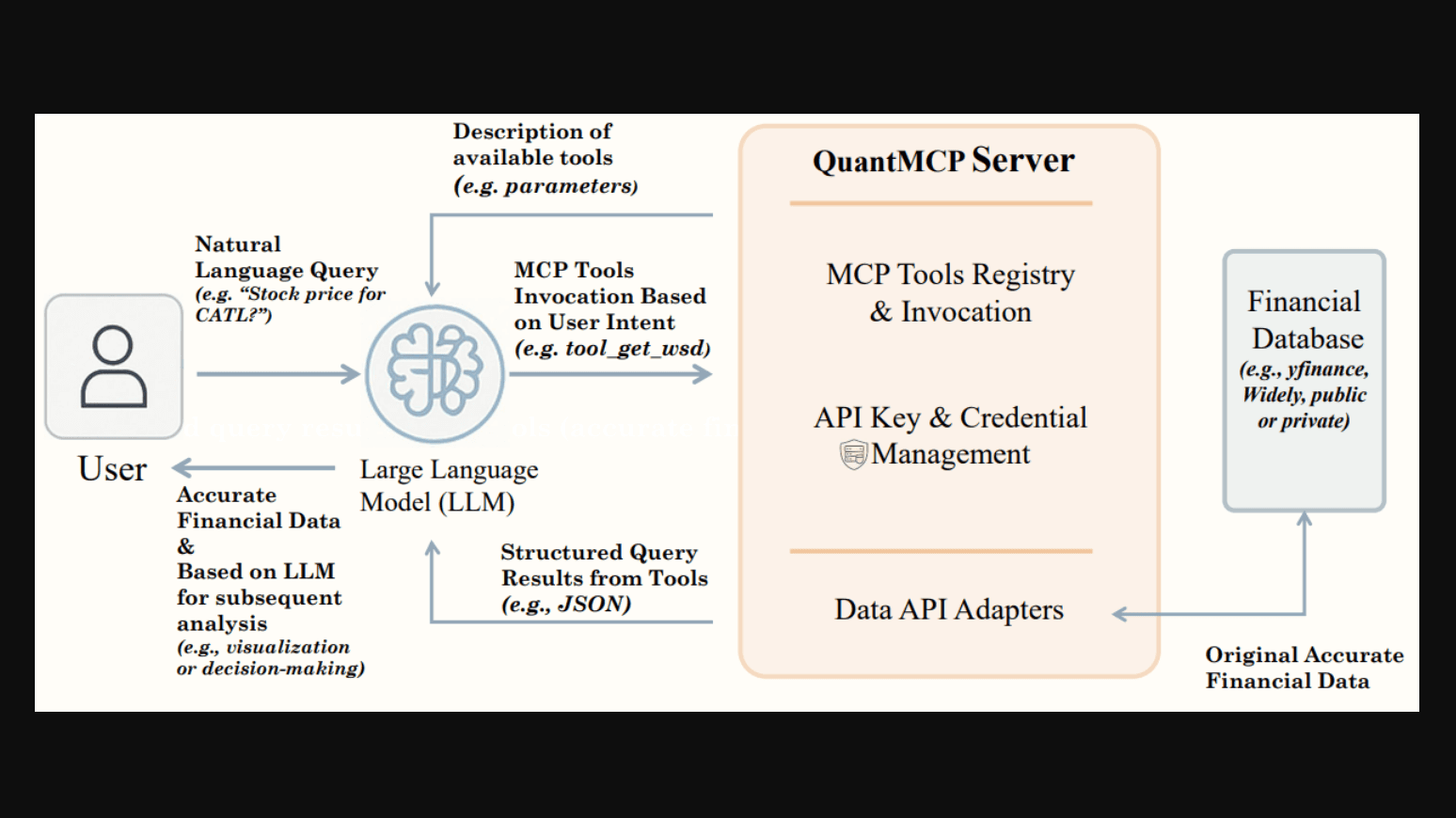
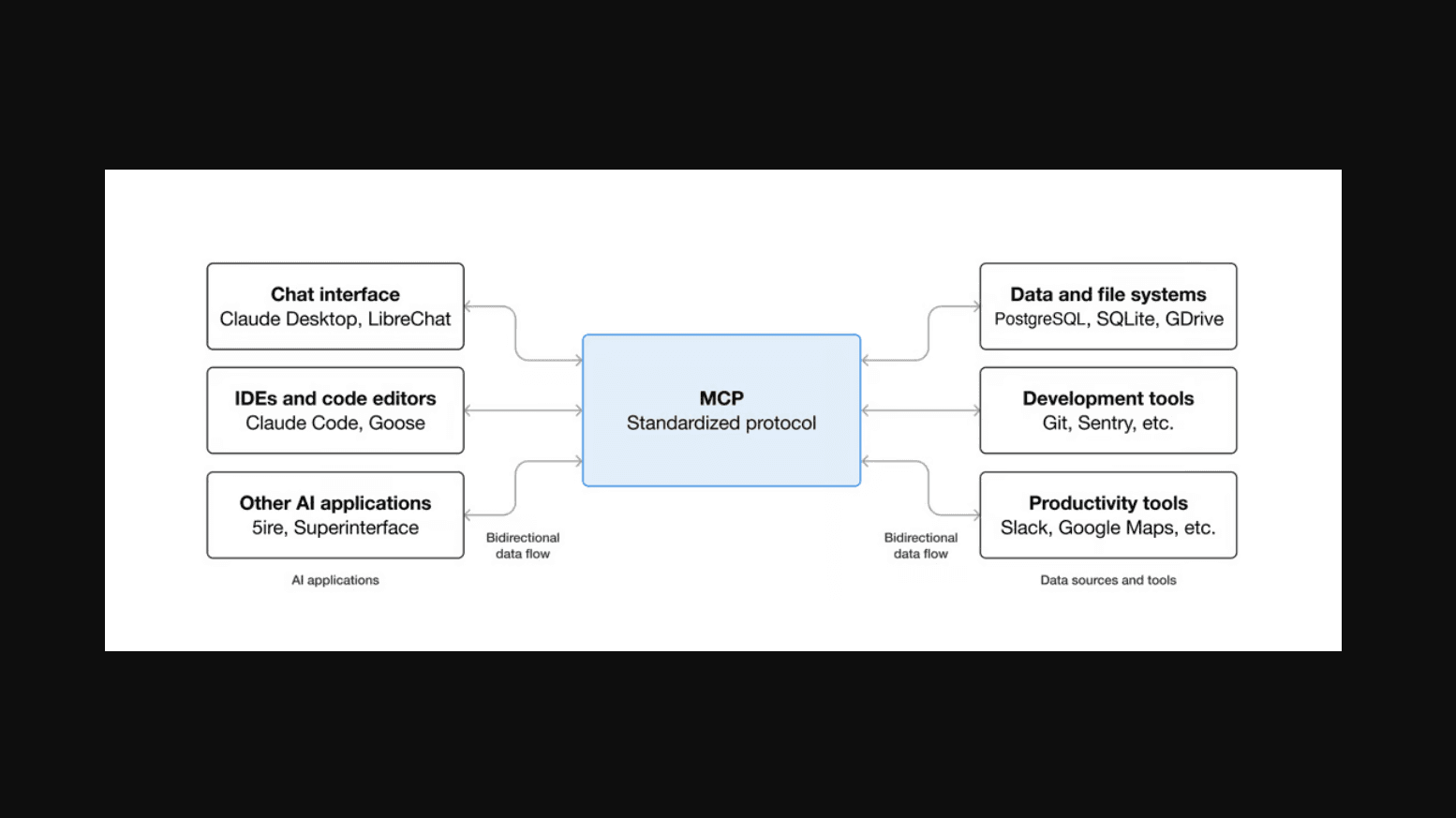
A Model Context Protocol is simply a link between the AI and the tools that it needs to use to perform said tasks, with a human-in-the-loop deciding the use case.
It can decide tools, parameters, permissions, and outputs for you automatically without requiring you to hop around two to three wrappers.
Step-by-step functioning of MCP:
- Run MCP along with the data connector
- Connect and register the server with the AI
- 𝘨𝘦𝘵_𝘲𝘶𝘰𝘵𝘦𝘴, 𝘨𝘦𝘵_𝘰𝘳𝘥𝘦𝘳_𝘣𝘰𝘰𝘬 𝘰𝘳 𝘨𝘦𝘵_𝘤𝘱𝘪_𝘴𝘦𝘳𝘪𝘦𝘴 affirmed functions are now exposed. Data gets fetched from the server as per the parameter you type
What this does is that…it creates a bridge. Bridge between cloud and local models while also allowing control over credentials/logs, rate limits and permissions. To make sure the AI can only view or fetch data, allow read-only permissions.
Best open-source software you can use right away
- Fincept Terminal - Best for desktop native research, multi-asset analytics and wide data connectivity. Fast C++20 performance, but not really for ultra-low-latency high-frequency trading.
- OpenBB - Good name in the game for Python data analysis, proprietary data integration, dashboards and agentic work. But mainly a data viewing platform, not for full-fledged trading.
- Vibe-Trading - CLI research, strat generation, multi-agent cross-checking and backtesting. Meant for simulation only though (as per official scope mentioned).
- AI-Trader - Great for simulated capital trading, good signal feed, strategy mirroring via collaborative agents. Supports OpenClaw, nanobot, Claude Code, Codex, Cursor, and more.
Note: Most AI agents show poor returns or weak risk management if based on general intelligence. So final success still depends on “human intelligence”
How do you build a personal open-source trading copilot?
Keep in mind these three rules:
- Rule 1: Install only one research terminal to keep the setup clean,
- Rule 2: Connect one trusted source,
- Rule 3: Turn trade-related executions off (permission-based) so that they don’t happen in hindsight.
Example basic OpenBB-style AI terminal install:
𝘱𝘺𝘵𝘩𝘰𝘯 -𝘮 𝘷𝘦𝘯𝘷 .𝘷𝘦𝘯𝘷
𝘴𝘰𝘶𝘳𝘤𝘦 .𝘷𝘦𝘯𝘷/𝘣𝘪𝘯/𝘢𝘤𝘵𝘪𝘷𝘢𝘵𝘦
𝘱𝘪𝘱 𝘪𝘯𝘴𝘵𝘢𝘭𝘭 𝘰𝘱𝘦𝘯𝘣𝘣 𝘰𝘱𝘦𝘯𝘣𝘣-𝘮𝘤𝘱-𝘴𝘦𝘳𝘷𝘦𝘳 𝘱𝘢𝘯𝘥𝘢𝘴 𝘯𝘶𝘮𝘱𝘺
𝘰𝘱𝘦𝘯𝘣𝘣-𝘮𝘤𝘱
To turn on your vm on Windows use .𝘷𝘦𝘯𝘷\𝘚𝘤𝘳𝘪𝘱𝘵𝘴\𝘢𝘤𝘵𝘪𝘷𝘢𝘵𝘦. . After testing the package versions, keep a tab on them…but never paste broker creds into the prompt.
Python example code to compare buy/sell quantities in the order book:
𝘣𝘪𝘥 = 𝘣𝘰𝘰𝘬.𝘭𝘰𝘤[𝘣𝘰𝘰𝘬["𝘴𝘪𝘥𝘦"] == "𝘣𝘪𝘥", "𝘴𝘪𝘻𝘦"].𝘴𝘶𝘮()
𝘢𝘴𝘬 = 𝘣𝘰𝘰𝘬.𝘭𝘰𝘤[𝘣𝘰𝘰𝘬["𝘴𝘪𝘥𝘦"] == "𝘢𝘴𝘬", "𝘴𝘪𝘻𝘦"].𝘴𝘶𝘮()
𝘵𝘰𝘵𝘢𝘭 = 𝘣𝘪𝘥 + 𝘢𝘴𝘬
𝘪𝘮𝘣𝘢𝘭𝘢𝘯𝘤𝘦 = (𝘣𝘪𝘥 - 𝘢𝘴𝘬) / 𝘵𝘰𝘵𝘢𝘭 𝘪𝘧 𝘵𝘰𝘵𝘢𝘭 𝘦𝘭𝘴𝘦 0.0
𝘱𝘳𝘪𝘯𝘵(𝘳𝘰𝘶𝘯𝘥(𝘪𝘮𝘣𝘢𝘭𝘢𝘯𝘤𝘦, 4))
The numbers alone are not a foolproof signal. Always check it versus real spread, time, ups and downs, and trades' own past patterns.
During analysis use a prompt which should consist of:
- Data with exact time-stamps.
- Source, market time, and fields that are left out.
- All calculation metrics in Python.
- Values within a set span.
- Asks for evidence/counter-evidence, risk limits, “no trade” situation reasonings.
- Non-automated order sending (must get your approval).
Make sure that risk controls still pass through you
You see…local environments aren’t private. The code might run on your PC, but any prompt run can still leak data to the cloud.
Keeping data on-prem by running the model locally with added hardware…that is doable. But that doesn’t mean tool mishaps, hallucinations, and loose prompts won’t leak out and mess your workflow.
MCP increases security risks even more. Therefore, use only read-only tools, access lists that are approved, trustworthy servers, different data for live trade and simulated. A good suggestion here is to always run tests in sandbox mode, which is well restricted so that if you’re running live code for a client, then no mistakes happen due to faulty code on live trades.
Lastly, never, ever, ever allow the AI full control of your money. Let it suggest, but you take the final call. Let it explain to you if it notices any anomaly or collects the data and finds irrelevant noise within it.
Profit-making should not be automatic. Use AI responsibly for gathering proof, helping you reason better, so that you can have more control over your decision-making.