MCP, Connectors, and Tool-Calling: The Hidden Standards Behind the AI App Boom
After a meeting ends, everyone usually has the summary or gist in mind, but it still needs to be documented for everything to stay on the record. An AI meeting tool with MCP integration now makes that happen in a snap (with the right tools and permissions set up).
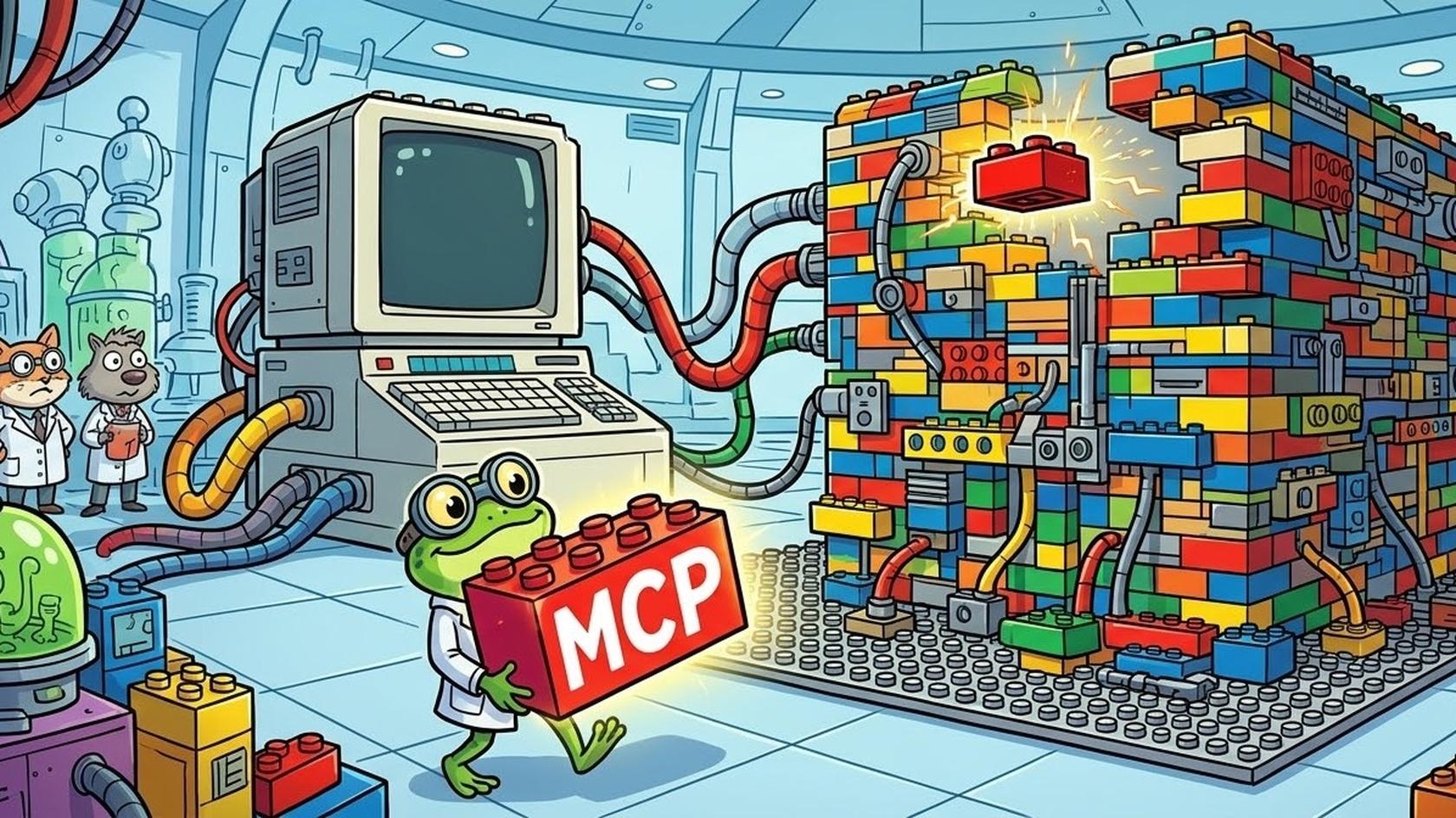
Much like how USB-C creates a universal connection, the Model Context Protocol (MCP) provides a universal format. It provides an organised sequence for applications to access each other's resources.
Anthropic released its MCP in late Nov 2024, which included development kits and Claude Desktop support. and a server for services like Google Drive, Slack, GitHub, and Postgres. Tools could already be used by AI applications before that via APIs…but MCPs made these usages iterative and cross-platform connect-ready.
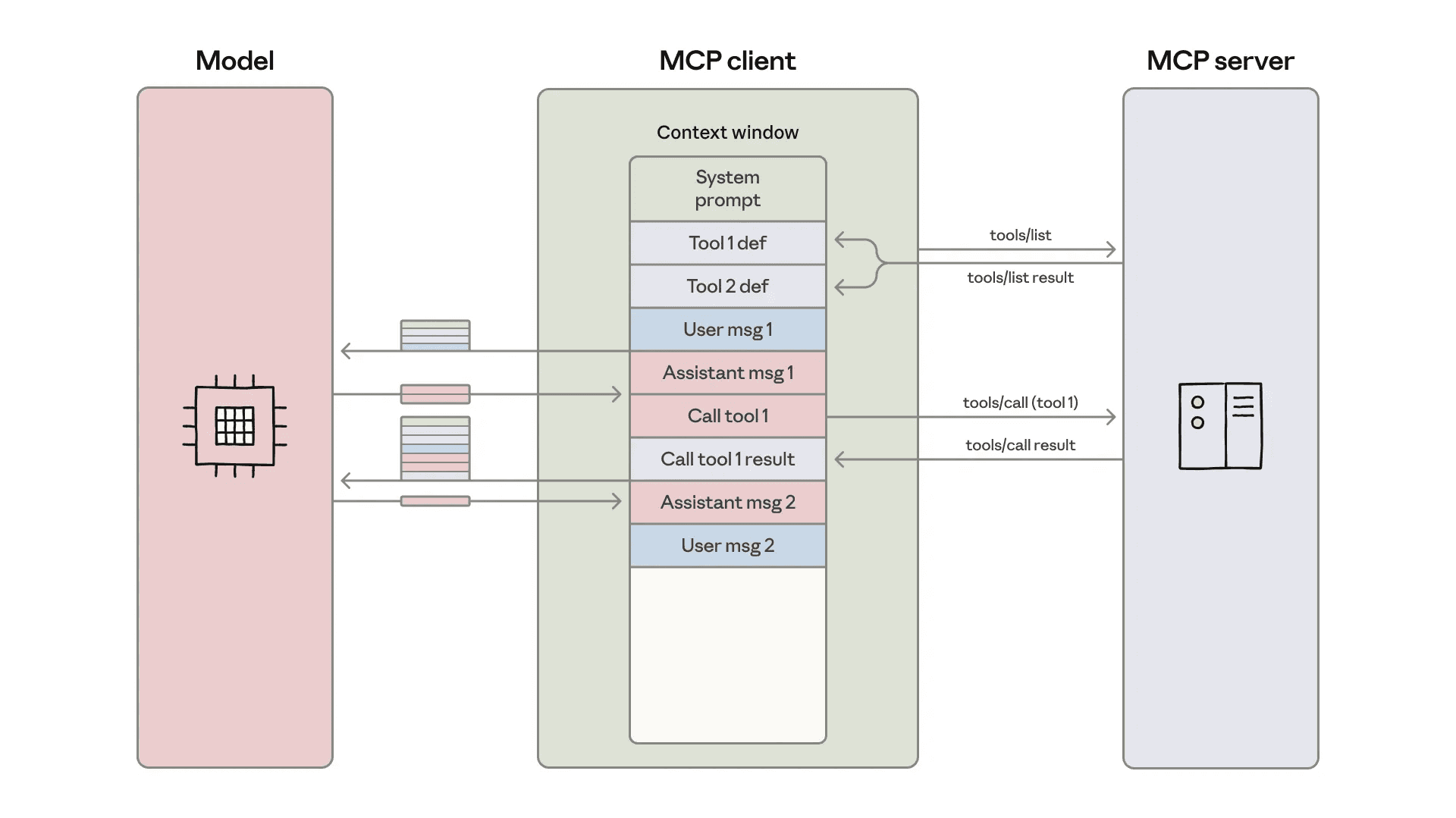
MCP connects the assistant, the tool, and the business system
Source: Code execution with MCP: building more efficient AI agents \ Anthropic
So, what is an MCP tool in AI?
An MCP tool is a function that an MCP server describes to the AI: its name, what it does, and which inputs it needs. The model asks to use it; the application runs it and returns the result.
Example-wise, add_meeting_note MCP tool would require some customer ID and a note text. The model would seek these values and the code of the application would handle the rest of the request. The server here just acts as the bridge that performs the execution and tool specific exchange.
Tools, resources and prompts serve different purposes
MCP separates three building blocks:
Tools can be used by the AI to fetch or change any info (file updates, clicking a button).
Resources Are files or data, like maybe a saved transcript with a unique URI link. The chosen host's decision on how this data would be fed.
Prompts are the written instructions that can be used at specific steps by the user.
A server need not provide all three.
Resources are one specific protocol feature. A transcript the assistant reads isn’t automatically a resource, as it could just as well arrive through a search tool. A transcript could also arrive via a search tool.
How a request becomes a completed action
In line with the above example, the sequence would be:
Client checks the protocol version or rules and features supported.
It then asks for the available tool lists and how to run them.
The LLM picks the tool and fills in the info (for example, maybe the customer ID).
Safety rules and manual approval, if needed, are sought by the host app.
The server validates the sent action trigger and updates the CRM through its API.
Result or action output comes to the host. LLM gets the proof to provide the final readable and perceivable output.
Proper verification from the apps regarding both user permission and meeting details belonging to the correct account is necessary, as typed requests can still have the wrong name entry. Although you can edit the instruction once something is sent, reluctantly it will fetch the wrong output.
Older implementations start with initialisation handshakes. The 28 July 2026 revision instead carries version and capability information with individual requests. Its core is stateless: retaining the conversation remains the application’s responsibility.
What is MCP in AI agents tool calling?
It’s the communication contract through which the agent’s application discovers and invokes external capabilities. MCP messages use JSON-RPC 2.0, a structured format for requests and responses. Local servers can communicate through standard input and output; remote servers commonly use Streamable HTTP.
The model proposes an operation, while software carries it out and returns the result. This separation lets applications check an action before it reaches company systems. Each request says which MCP version it uses.
Consider four AI assistants, each of which needs to connect with six tools within an organization. If a user wants to build custom links for every single one, it would be 4 × 6 = 24 separate connections.
This multiplication turns to addition because of MCP. It gives each assistant and tool a shared plug, which brings the final reusable pieces to 4 + 6 = 10.
Devs still have to match up respective data fields or fix any expired/hallucinated data, info, or password, and shoot prompts based on system speed and ensure proper testing environments. Now if any API rule gets updated within the CRM, only one of its respective adapters needs to be updated rather than rewriting the code of four different AI systems.
The ecosystem is substantial: the Linux Foundation reported more than 10,000 published MCP servers in December 2025. That figure counts servers published in December 2025. It says nothing about how many are secure or still maintained.
MCP vs tool calling AI agents debate
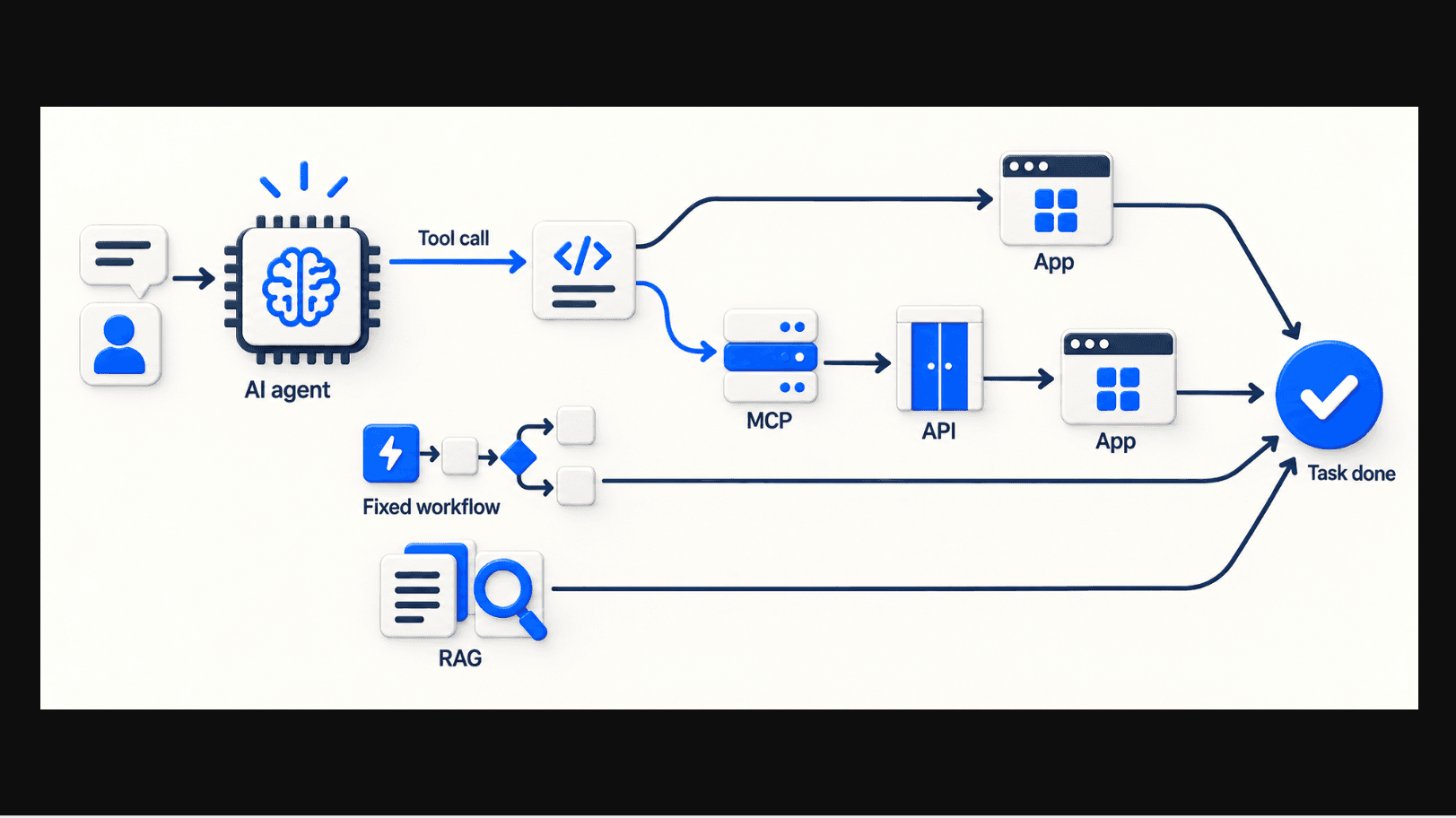
AI agent workflow process using the tool/MCP, RAG, and fixed workflow
Tool calling is how a model asks for a function to be run. MCP is a shared format for describing those functions and reaching them, so you can use one without the other.
At the backend, the server still uses standard web APIs like REST. The final goal is getting the task done. The AI agent/LLM in use can use either the tool/MCP, only the tool, or AI + MCP + tool to get to its goal.
To explain this more easily, usually three kinds of setups are put to use:
Fixed workflows: They are static, strict, and based on an "if x then y" kind of step-by-step predictable process. Hence best for predictable tasks.
Retrieval-Augmented Generation (RAG) reduces the chances of AI hallucination via better retrieval or document and fact searching. The MCP simply connects the AI with the web interface.
The MCP, which is a reusable connection that stays there but depending on the task the AI chooses to use it or not to generate the final output.
Everything here is complementary…not competing. For example the famous automation platform Zapier itself offers MCP to connect other apps and the platform with AI agents and work coherently.
A simple prompt actually calls for a chain of actions
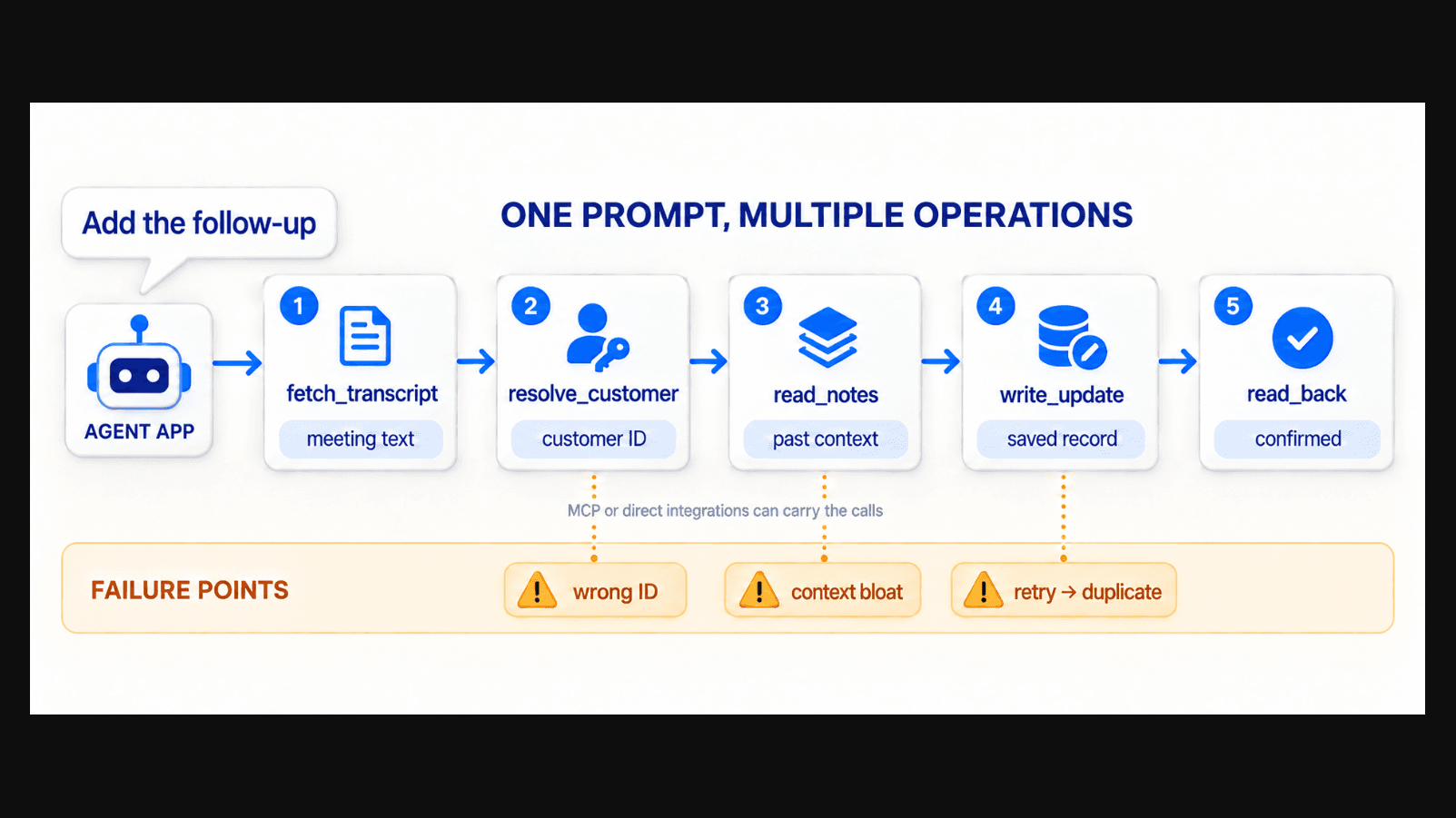
How a prompt triggers a chain of reactions
The user types "add the follow-up" but beneath the tool the AI is actually:
fetching the meeting transcript.
figuring out the exact client/customer.
going through past notes and memory.
saving new updates in its old .md memory file.
confirming the new update is saved.
In one of the threads in r/ClaudeAI, someone mentioned how Cline (AI coding assistant tool), fixed itself mid-chain of thought when it encountered a database structure error while building a Notion MCP server. This doesn't mean every instruction would be self-reflective and AI would fix the wrongs.
Multiple-step prompts require the LLM to go through
dozens of files and previous chat history;
Hundreds of customer info with subtle nomenclature changes;
Slow tasks getting rephased with "fast, please" kinda prompts.
Basically back-and-forth messaging and looping of chains of thought eventually confuses AI, increases the chances of hallucination, and hence can generate slop with or without MCP.
Too much fed data and retrieval prompts can clutter an AI fetch operation. In one example, ~55,000 tokens finished even before the user wrote a single prompt, just cause they fed 58 tool definition files before the run. As more and more AIs are following the RAG route, writing prompts that do not overburden the context and memory size is the way to go.
Loading every tool description creates another cost. Anthropic documented an example where 58 tools consumed roughly 55,000 tokens before conversation began. Discovering only relevant tools leaves more room for the actual task, a concern related to context and AI memory.
The application also needs retry limits and a check that a write succeeded before repeating it. Otherwise, a lost confirmation could become two identical customer notes.
Results can also be interactive. The optional MCP Apps extension lets compatible hosts display forms and charts inside conversations, typically within a restricted browser frame. That interface requires support beyond basic tool calling.
For a concrete product example, V7 Go documents a Salesforce update displayed as a deal card inside chat. The card helps users inspect the outcome without opening another tab.
Connected tools need boundaries that prompts can’t enforce
On 1 April 2025, Invariant Labs demonstrated tool-poisoning attacks: malicious instructions hidden inside tool descriptions could steer an assistant towards leaking data. Researchers also described “rug pulls”, where a server changes its description after being approved.
A retrieved document can carry similar instructions. A meeting transcript telling the assistant to send customer records elsewhere is external content. It grants no permission. This is indirect prompt injection: instructions arrive through material the assistant was meant to read. Prompt injection and excessive agency both appear in OWASP’s LLM risk guidance.
Practical controls belong in the software:
Each connection should receive only the records and operations it needs;
Code should enforce allowed tools and input checks, with access checked at the server too;
Sensitive writes or external sharing should require meaningful review;
Reviews should catch changed tool descriptions, while records of calls, approvals and outcomes should exclude secrets.
A proper approval screen shows all the info from the customers, the exact note, and the change required. Just “allow access?” prompt in this case it stands vague and won't let the operator edit any mistake.
When standards are shared work turns into workflows
MCP no longer belongs to Anthropic alone. OpenAI adopted it in its Agents SDK in March 2025, Google added it to the Gemini API and SDK at Google I/O in May 2025, and since 9 December 2025 it sits under the Linux Foundation’s Agentic AI Foundation.
Routing back to the initial example, simply typing "save the meeting follow-up" does not get the work done. The MCP beneath it acts as the universal cable that makes sure the note connects with the right customer profile. The user is able to save it and has the right permissions. Finally every step in the system is verified without any errors. Only then does the AI tool return the "work done" affirmation.